https://github.com
Please register for a GitHub account above and then drop your GitHub username (NOT EMAIL) in a forum PM (not on discord) to me and I will invite you to the project.
New issues can be created or removed by anyone however please be responsible with this. The list is backed up automatically each day. Issues should only be closed once they are fully verified by myself. Notes should be left on each task describing the problem in detail, who tested what and how the results turned out. As much information as necessary to keep track of things. If someone is going to test something add a comment to the issue first or request it to be assigned to you so that multiple people aren't testing the same thing.
GUIDE
1. Go to https://github.com/michaelpece/mcnr-issues/issues
2. Click 'New Issue'
3. Give it a relevant title that describes the issue in a few words e.g. 'Stuck on black screen when entering bank'
4. Give it a description that further describes the issue. I need to know what happened, where it happened, why it happened, what you did before that may have caused it etc. please don't just post a problem and give me no further information on what you were doing at the time because then I can't reproduce it.
5. You can assign labels to issues on the right hand side after posting. Assign a priority and a bug/enhancement label at the very least. Do not leave issues unlabelled.
6. You can post comments on issues to discuss with other testers and myself, and to add more info.
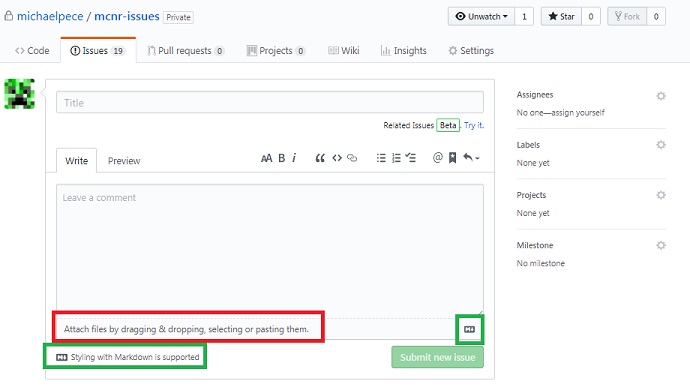
- Click the red area to attach an image directly from your computer. No more having to separately upload images to imgur or similar.
- Click one of the green areas to view markdown syntax to make text bold/italic etc.
Thanks
