

How to play
Please see the below items for help getting on the server and playing.
Download the SA-MP client
Because https://sa-mp.com is no longer active, we are hosting our own copy of the SA-MP 0.3.7-R5 client here:
https://mikescnr.com/client/sa-mp-0.3.7-R5-1-install.exe
If the above link doesn't work, the download is uploaded and pinned to the #news channel on our Discord server.
Downgrade your GTA:SA game
You need game version 1.0 to play SA-MP.
If you have a later version, you can use a 'downgrader': https://www.gtainside.com/en/sanandreas/other/16141-downgrade-patch/download/
Add the server to favourites
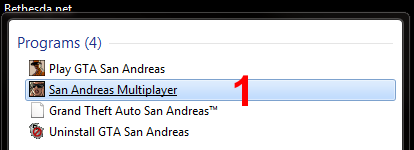
1. Launch the SA-MP client.
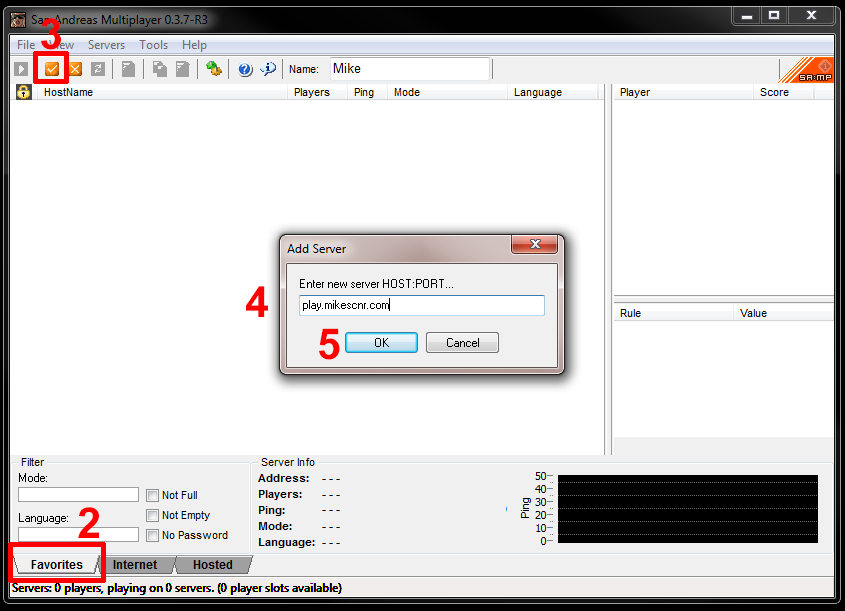
2. Navigate to the 'Favourites' tab. This is shown by default when SA-MP is launched.
3. Click the 'Add server' button.
4. Enter play.mikescnr.com in the address bar. The port does not need specifying as it will default to 7777.
5. Press OK.
Connect to the server
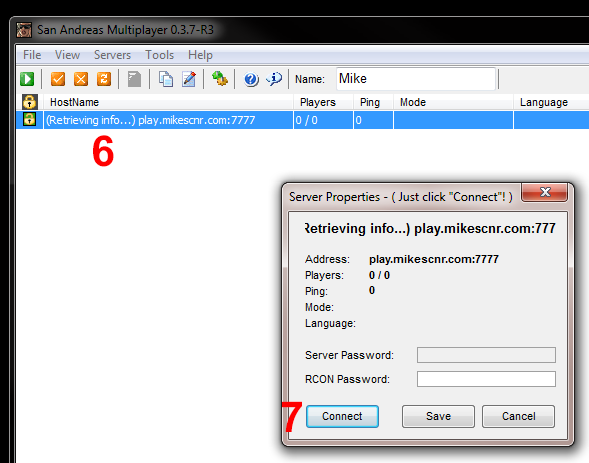
6. Once you have added the server to your favourites list, simply double-click it and then click 'Connect'.
7. Click 'Connect' to connect to the server.
Look forward to seeing you on the server!

